
Kubernetes#
Kubernetes is a popular open-source container orchestration platform that automates the deployment, scaling, and management of containerised applications. It provides a robust and scalable infrastructure for running microservices and containerised applications across multiple nodes.
Kubernetes is a powerful tool that enables developers to deploy, manage, and scale containerised applications across multiple nodes. It provides a declarative way to define the desired state of the application, and automatically manages the deployment, scaling, and health of the application.
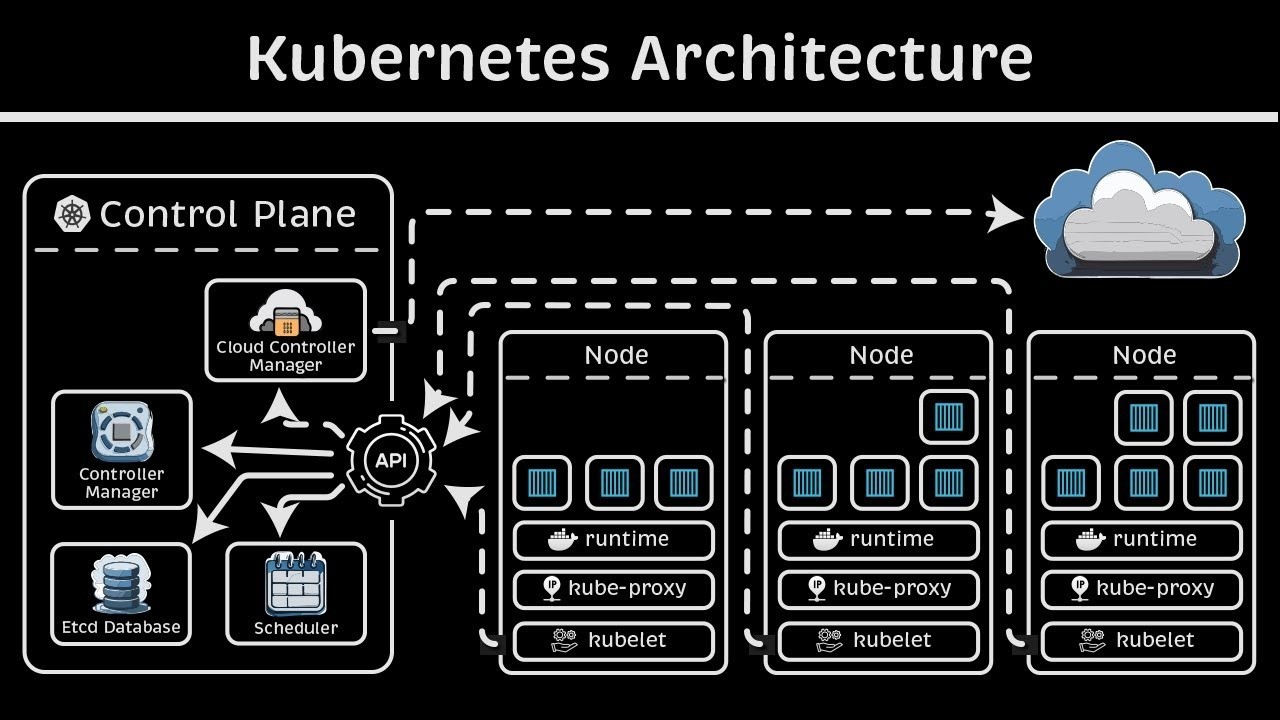
Homelab Architecture#

Most of the componets where chosen mostly because I had to choose something and can easly swapped out for example ArgoCD with Flux.
I have chosen K3S as my Kubernetes distribution of choice as it is a lightweight Kubernetes distribution that is easy to install and manage. It is designed to be lightweight and easy to use, making it ideal for small and medium-sized Kubernetes clusters.
A good alternative is K0s , a lightweight Kubernetes distribution that is easy to install and manage. It is designed to be lightweight and easy to use, making it ideal for small and medium-sized Kubernetes clusters.
For enterprise you have Redhat Openshift very opinionated and SUSE Rancher RKE2 .
Cloud providers like Google, AWS and Azure to name a few.
Homelab Kubernetes Architecture#

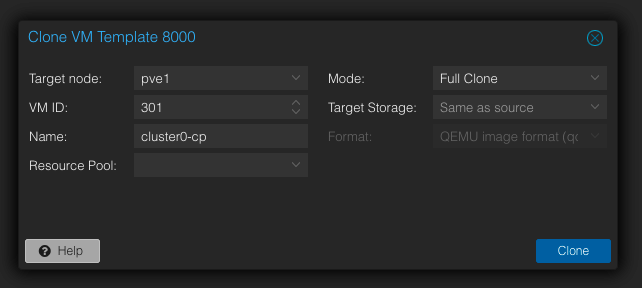
At this stage we have our baremetal hardware installed and ready. We will now deploy our virtual servers for our kubernetes cluster.
We will create 4 virtual servers using our Debian Template in Proxmox.
Install packages#
Connect to each vm using ssh and install the following packages.
sudo apt update;
sudo apt install qemu-guest-agent -y
#start the service now and on reboot
sudo systemctl enable qemu-guest-agent --now
Configure Kernel modules & Parameters#
sudo su;
echo "net.ipv4.conf.all.arp_ignore = 1" >> /etc/sysctl.conf;
echo "net.ipv4.conf.all.arp_announce = 1" >> /etc/sysctl.conf;
echo "net.ipv4.ip_nonlocal_bind=1" >> /etc/sysctl.conf;
echo "fs.inotify.max_user_watches=2099999999" >> /etc/sysctl.conf;
echo "fs.inotify.max_user_instances=2099999999" >> /etc/sysctl.conf;
echo "fs.inotify.max_queued_events=2099999999" >> /etc/sysctl.conf;
sysctl -p;
Install k3sup tool on desktop#
curl -sLS https://get.k3sup.dev | sh
sudo install k3sup /usr/local/bin/
Configure Cluster#
export TOKEN=$(head -c 64 /dev/urandom|shasum| cut -d - -f 1)
export vip=172.16.10.1
export context=cluster0
Install 1st node#
k3sup install --user cw --ip $vip \
--token=${TOKEN} \
--k3s-extra-args '--flannel-backend=none --disable traefik --disable servicelb --disable-network-policy --disable-cloud-controller --kubelet-arg containerd=/run/k3s/containerd/containerd.sock --kubelet-arg cloud-provider=external --tls-san ${vip}  --kube-controller-manager-arg bind-address=0.0.0.0 --kube-proxy-arg metrics-bind-address=0.0.0.0 --kube-scheduler-arg bind-address=0.0.0.0 \
--tls-san=172.16.10.1 --cluster-cidr=10.42.0.0/16,fd00:10:240::/48 --service-cidr=10.43.0.0/16,fd00:10:96::/112' \
--local-path ~/.kube/config \
--merge \
--context ${context}
Please note the above can be repeated for each server node by changing the vip address.
Join worker nodes#
k3sup join --user cw --ip 172.16.10.2 --server-ip 172.16.10.1;
k3sup join --user cw --ip 172.16.10.3 --server-ip 172.16.10.1;
k3sup join --user cw --ip 172.16.10.4 --server-ip 172.16.10.1;
Check status#
➜ k get nodes
NAME            STATUS     ROLES                  AGE     VERSION
cluster0-cp1    NotReady   control-plane,master   18m     v1.33.6+k3s1
cluster0-wrk1   NotReady   <none>                 2m14s   v1.33.6+k3s1
cluster0-wrk2   NotReady   <none>                 52s     v1.33.6+k3s1
cluster0-wrk3   NotReady   <none>                 24s     v1.33.6+k3s1
Please note that cluster should state NotReady until we install a CNI
Gateway API#
Install CRD’s#
k apply --server-side -f https://github.com/kubernetes-sigs/gateway-api/releases/download/v1.4.1/experimental-install.yaml
We using the experimental branch to enable tls routing
Cilium#
Install cilium cli using app store or homebrew
brew install cilium-cli
cilium version
  cilium-cli: v0.18.8 compiled with go1.25.3 on darwin/arm64
  cilium image (default): v1.18.2
  cilium image (stable): v1.18.4
  cilium image (running): 1.18.4
Install Cilium using cli#
Create values.yaml file
# values.yaml
k8sServiceHost: 172.16.10.1
k8sServicePort: 6443

kubeProxyReplacement: true

l2announcements:
  enabled: true

externalIPs:
  enabled: true

k8sClientRateLimit:
  qps: 50
  burst: 200

operator:
  # replicas: 1  # Uncomment this if you only have one node
  rollOutPods: true

rollOutCiliumPods: true
ingressController:
  enabled: false

gatewayAPI:
  enabled: true

hubble:
  relay:
    enabled: true
  ui:
    enabled: true

bgpControlPlane:
  enabled: true
Install using cli
cilium install --version 1.18.4 --values values.yaml
Check status
➜ cilium status --wait
   /¯¯\
/¯¯\__/¯¯\    Cilium:             OK
\__/¯¯\__/    Operator:           OK
/¯¯\__/¯¯\    Envoy DaemonSet:    OK
\__/¯¯\__/    Hubble Relay:       OK
   \__/       ClusterMesh:        disabled

DaemonSet              cilium                   Desired: 4, Ready: 4/4, Available: 4/4
DaemonSet              cilium-envoy             Desired: 4, Ready: 4/4, Available: 4/4Deployment             cilium-operator          Desired: 1, Ready: 1/1, Available: 1/1
Deployment             hubble-relay             Desired: 1, Ready: 1/1, Available: 1/1
Deployment             hubble-ui                Desired: 1, Ready: 1/1, Available: 1/1
Containers:            cilium                   Running: 4
                      cilium-envoy             Running: 4
                      cilium-operator          Running: 1
                      clustermesh-apiserver
                      hubble-relay             Running: 1
                      hubble-ui                Running: 1
Cluster Pods:          5/5 managed by Cilium
Helm chart version:    1.18.4
Image versions         cilium             quay.io/cilium/cilium:v1.18.4@sha256:49d87af187eeeb9e9e3ec2bc
6bd372261a0b5cb2d845659463ba7cc10fe9e45f: 4                       cilium-envoy       quay.io/cilium/cilium-envoy:v1.34.10-1762597008-ff7ae7d623be0
0078865cff1b0672cc5d9bfc6d5@sha256:1deb6709afcb5523579bf1abbc3255adf9e354565a88c4a9162c8d9cb1d77ab5: 4                       cilium-operator    quay.io/cilium/operator-generic:v1.18.4@sha256:1b22b9ff28affd
f574378a70dade4ef835b00b080c2ee2418530809dd62c3012: 1                       hubble-relay       quay.io/cilium/hubble-relay:v1.18.4@sha256:6d350cb1c84b847adb
152173debef1f774126c69de21a5921a1e6a23b8779723: 1                       hubble-ui          quay.io/cilium/hubble-ui-backend:v0.13.3@sha256:db1454e45dc39
ca41fbf7cad31eec95d99e5b9949c39daaad0fa81ef29d56953: 1                       hubble-ui          quay.io/cilium/hubble-ui:v0.13.3@sha256:661d5de7050182d495c64
97ff0b007a7a1e379648e60830dd68c4d78ae21761d: 1
At this stage you might want to taint your control plan nodes to not run any workloads as k3s by default allows workloads to run on control plan nodes.
k taint node cluster0-cp1 CriticalAddonsOnly=true:NoExecute
k config set-context --current --namespace=homelab
Lets create our l2 Announcement policy
#l2.yaml
---
apiVersion: cilium.io/v2alpha1
kind: CiliumL2AnnouncementPolicy
metadata:
  name: default-l2-announcement-policy
  namespace: kube-system
spec:
  interfaces:
    - eth0
  externalIPs: true
  loadBalancerIPs: true
---
Make sure to use the correct network interface.
Now lets create our ip pool file.
# ippool.yaml
---
apiVersion: cilium.io/v2
kind: CiliumLoadBalancerIPPool
metadata:
  name: first-pool
spec:
  blocks:
  #- cidr: 172.16.10.1/24
  - start: 172.16.10.20
  - stop: 172.16.10.200
Apply these manifests.
k apply -f l2.yaml -f ippool.yaml
Before we create our gateway lets install cert-manager to manage our certs.
Cert-Manager#
We will install cert-manager enabling gateway api support
# Add helm repo
helm repo add jetstack https://charts.jetstack.io --force-update

# Install
helm upgrade --install \
  cert-manager jetstack/cert-manager \
  --namespace cert-manager \
  --create-namespace \
  --set crds.enabled=true --set "extraArgs={--feature-gates=ExperimentalGatewayAPISupport=true,--dns01-recursive-nameservers=1.1.1.1:53\,9.9.9.9:53,--dns01-recursive-nameservers-only}"
Setup and configure cert-manager to your requirements.
Example of ClusterIssuer
#ClusterIssuer.yaml
apiVersion: cert-manager.io/v1
kind: ClusterIssuer
metadata:
  name: letsencrypt
  namespace: cert-manager
spec:
  acme:
    server: https://acme-v02.api.letsencrypt.org/directory
    email: [email protected]
    privateKeySecretRef:
      name: letsencrypt
    solvers:
      - dns01:
          cloudflare:
            email: [email protected]
            apiTokenSecretRef:
              name: cloudflare-token-secret
              key: cloudflare-token
        selector:
          dnsZones:
            - "c0.wagner.org.za"
Now that we have cert-manager setup we can procceed.
Create gateway#
#gateway.yaml
apiVersion: gateway.networking.k8s.io/v1
kind: Gateway
metadata:
  name: gateway
  namespace: kube-system
  labels:
    gateway: gateway
spec:
  gatewayClassName: cilium
  addresses:
  - type: IPAddress
    value:  172.16.10.20
  listeners:
    - name: https
      protocol: HTTPS
      port: 443
      allowedRoutes:
        namespaces:
          from: All
      tls:
        mode: Terminate
        certificateRefs:
          - kind: Secret
            name: wagner-tls
            namespace: kube-system
Apply it
k apply -f gateway.yaml
Check status
k get gateway -n kube-system
    NAME          CLASS    ADDRESS       PROGRAMMED   AGE
    gateway   cilium   172.16.10.20   True         20m
Add the following to your DNS server for name resourslutions or to your hosts file.
172.16.10.20 *.apps.c0.wagner.org.za
Now lets create a route for hubble ui
#hubble-ui-httproute.yaml
apiVersion: gateway.networking.k8s.io/v1beta1
kind: HTTPRoute
metadata:
  name: hubble
  namespace: kube-system
spec:
  parentRefs:
    - name: gateway
      namespace: kube-system
      sectionName: https
  hostnames:
    - "hubble.apps.c0.wagner.org.za"
  rules:
    - matches:
        - path:
            type: PathPrefix
            value: /
      backendRefs:
        - kind: Service
          name: hubble-ui
          port: 80
Apply the route
k apply -f hubble-ui-httproute.yaml
Check routes.
k get httproutes.gateway.networking.k8s.io -n kube-system
NAME     HOSTNAMES                           AGE
hubble   ["hubble.apps.c0.wagner.org.za"]   20h
eBGP#
Currently we are not able to route to our services as our network has now way of discovering these routes. We will now deploy BGP sharing and have cilium advertise our services to our router (Mikrotik).
Create bpg-peering manifest.
#bgp-peering-policy.yaml
apiVersion: "cilium.io/v2alpha1"
kind: CiliumBGPPeeringPolicy
metadata:
 name: bgp-peering-policy
spec:
 nodeSelector:
   matchLabels:
     bgp_enabled: "true"
 virtualRouters:
 - localASN: 64512
   exportPodCIDR: true
   neighbors:
    - peerAddress: '192.168.7.254/32'
      peerASN: 64512
   serviceSelector:
     matchExpressions:
       - {key: somekey, operator: NotIn, values: ['never-used-value']}
As you can see we only deploying to nodes labled bpg_enabled=true Lets lable our worker nodes
k label nodes wrk1 wrk2 wrk3 bgp_enabled="true"
node/wrk1 labeled
node/wrk2 labeled
node/wrk3 labeled
Now lets create our bgp policy.
k apply -f bgp-peering-policy.yaml
Now configure your route to match the bgp settings to your worker nodes in my example 192.168.50.2/32, 192.168.50.3/32 and 192.168.50.4/32.
Check status
cilium bgp peers
➜ cilium bgp peers
Node   Local AS   Peer AS   Peer Address    Session State   Uptime    Family         Received   Advertised
cp     65000      65000     192.168.7.254   established     2h1m31s   ipv4/unicast   1          9
                                                                     ipv6/unicast   0          0
wrk1   65000      65000     192.168.7.254   established     2h1m31s   ipv4/unicast   1          9
                                                                     ipv6/unicast   0          0
wrk2   65000      65000     192.168.7.254   established     2h1m32s   ipv4/unicast   1          9
                                                                     ipv6/unicast   0          0
wrk3   65000      65000     192.168.7.254   established     2h1m42s   ipv4/unicast   1          9
                                                                     ipv6/unicast   0          0
If the status is active and doesnt change to established check your router config and make sure you have bgp peering partners configured for each worker node.
Test connection
➜ curl -v https://hubble.apps.c0.wagner.org.za
* Host hubble.apps.c0.wagner.org.za:443 was resolved.
* IPv6: (none)
* IPv4: 172.16.10.20
*   Trying 172.16.10.20:443...
* Connected to hubble.apps.c0.wagner.org.za (172.16.10.20) port 443
* ALPN: curl offers h2,http/1.1
* (304) (OUT), TLS handshake, Client hello (1):
*  CAfile: /etc/ssl/cert.pem
*  CApath: none
* (304) (IN), TLS handshake, Server hello (2):
* (304) (IN), TLS handshake, Unknown (8):
* (304) (IN), TLS handshake, Certificate (11):
* (304) (IN), TLS handshake, CERT verify (15):
* (304) (IN), TLS handshake, Finished (20):
* (304) (OUT), TLS handshake, Finished (20):
* SSL connection using TLSv1.3 / AEAD-CHACHA20-POLY1305-SHA256 / [blank] / UNDEF
* ALPN: server did not agree on a protocol. Uses default.
* Server certificate:
*  subject: CN=*.c0.wagner.org.za
*  start date: Dec 14 09:09:07 2025 GMT
*  expire date: Mar 14 09:09:06 2026 GMT
*  subjectAltName: host "hubble.apps.c0.wagner.org.za" matched cert's "*.apps.c0.wagner.org.za"
*  issuer: C=US; O=Let's Encrypt; CN=R13
*  SSL certificate verify ok.
* using HTTP/1.x
> GET / HTTP/1.1
> Host: hubble.apps.c0.wagner.org.za
> User-Agent: curl/8.7.1
> Accept: */*
>
* Request completely sent off
< HTTP/1.1 200 OK
< server: envoy
< date: Tue, 30 Dec 2025 16:24:01 GMT
< content-type: text/html
< content-length: 702
< last-modified: Wed, 03 Sep 2025 09:25:19 GMT
< etag: "68b8097f-2be"
< accept-ranges: bytes
< x-envoy-upstream-service-time: 2
<
* Connection #0 to host hubble.apps.c0.wagner.org.za left intact
<!doctype html><html><head><meta charset="utf-8"/><title>Hubble UI</title><base href="/"/><meta name="color-scheme" content="only light"/><meta http-equiv="X-UA-Compatible" content="IE=edge"/><meta name="viewport" content="width=device-width,user-scalable=0,initial-scale=1,minimum-scale=1,maximum-scale=1"/><link rel="icon" type="image/png" sizes="32x32" href="favicon-32x32.png"/><link rel="icon" type="image/png" sizes="16x16" href="favicon-16x16.png"/><link rel="shortcut icon" href="favicon.ico"/><script defer="defer" src="bundle.main.046b68211246343ab6d5.js"></script><link href="bundle.main.250ac4c5d4e736844d1e.css" rel="stylesheet"></head><body><div id="app" class="test"></div></body></html>%
Using cilium cli.
cilium connectivity test
Check out Kairos — Immutable Kubernetes OS